If you’re looking for a smart cleaning solution that vacuums and mops your floors effortlessly, the Xiaomi Robot Vacuum-Mop Pro might be your best bet. But like any tech gadget, it’s not without its quirks. I recently bought one, set it up, and ran into a few common problems—some frustrating, some easy to fix. In this guide, I’ll walk you through the setup process, troubleshooting tips, and where to find the best deals on this handy little cleaner.
Xiaomi Robot Vacuum-Mop Pro Setup & Installation Problems
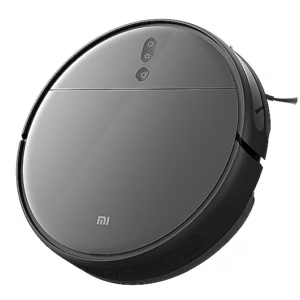
When I first unboxed my Xiaomi Robot Vacuum-Mop Pro, I was excited but also a bit overwhelmed. The installation process seemed straightforward, but I hit a few snags. For starters, the Wi-Fi connection kept dropping during setup. Turns out, the robot prefers a 2.4GHz network over 5GHz—something the manual didn’t emphasize enough.
Another hiccup? The Xiaomi Home app wouldn’t recognize the device at first. After a few failed attempts, I realized I had to reset the robot by holding the power and home buttons for 5 seconds. Once that was done, pairing was a breeze. If you’re struggling with connectivity issues, double-check your router settings and make sure your phone’s Bluetooth is on—it helps with the initial handshake.
Common Xiaomi Vacuum-Mop Pro Errors & How to Fix Them
1. Robot Not Charging Properly
One morning, I noticed my Xiaomi Robot Vacuum-Mop Pro wasn’t charging even though it was docked. After some panicked Googling, I found that dust can clog the charging contacts. A quick wipe with a dry cloth fixed it. If that doesn’t work, try repositioning the docking station on a flat surface—it’s surprisingly finicky about alignment.
2. Mop Pad Not Detected
I love the mopping feature, but sometimes the robot acts like the mop attachment isn’t there. The fix? Remove and reattach the pad firmly. Also, make sure the water tank is properly clicked in place. If the issue persists, a factory reset might be needed (hold the power button for 10 seconds).
3. Stuck on Carpets or Thresholds
My Xiaomi vacuum-mop kept getting stuck on my medium-pile rug. The solution was enabling carpet detection mode in the app, which makes the robot boost suction and avoid mopping on carpets. For high thresholds, I ended up using magnetic boundary strips to block problem areas.
Best Deals & Discounts on Xiaomi Robot Vacuum-Mop Pro
I snagged mine during a flash sale on Amazon, but you can also find great prices on AliExpress and Gearbest. Keep an eye out for Xiaomi official store promotions—they often bundle extra filters or mop pads. If you’re patient, Black Friday or Prime Day usually brings the lowest price on this model.
Despite a few setup headaches, my Xiaomi Robot Vacuum-Mop Pro has been a game-changer. The smart mapping is accurate, and the hybrid cleaning saves so much time. Just be prepared for some trial and error—like any smart device, it has its quirks.
Got your own Xiaomi vacuum-mop horror stories or tips? Drop them in the comments! And if you found this guide helpful, share it with fellow clean freaks. Happy cleaning!